iHeartRadio · Highlights & Clips
In progressTeaching an app what a clip is about.
Defining the content taxonomy and personalization strategy for short-form clips across iHeartRadio. AI as a working partner, and me in charge of the decisions.
- Client
- iHeartRadio, via Code & Theory
- My role
- Product Designer: led taxonomy & personalization strategy
- Worked with
- Product, Engineering, Data, Legal and our clips partner
- Timeline
- 2026 · ongoing
- Tools
- Figma · Google Sheets · Claude
The problem
iHeart was adding video clips across the app, with no shared way to describe them. No description, no personalization.
What I did
Defined a taxonomy that tags most of each clip automatically, mapped where clips live, and turned it into personalization rules.
How
With AI as my drafting partner: faster first versions, my decisions.
Status
Taxonomy done and shared with the clips partner. Personalization in progress.
01How I worked with AI
I led the direction. AI drafted.
I used Claude as a working partner across the whole project. The loop was simple: I set the direction, it proposed a first version, I pushed back, and we simplified until it was right. That freed my time for the part that matters: decisions and conversations with the team.
Me
Set the direction
AI
Drafts a first version
Me
Push back
Together
Simplify until it’s clear
Back to the start
Turning points: where my judgment changed the work
Simplifying the taxonomy.
The deeper versions were confusing, so we cut layers until it clicked. “YES! now is way more clear.”
Who matches clips to listeners.
I realized the clips partner wouldn’t personalize, they’d only hand us tagged clips. That changed how we framed the whole strategy. “I don’t think they’ll be doing the matching. I think they only give us the clips with the tags.”
Time of day.
People might want something from the previous day. So time of day became a way to know which show someone hears, not a switch for content. “What if they want to catch up on yesterday’s show?”
Segments.
They weren’t ready. We moved them later and rewrote the questions in plain words. “The segments still need work, we didn’t do deep work on that.”
The right format for each audience
For Engineering and Data
Spreadsheets
They’re not designers, so dropdowns and yes/no answers get faster replies.
For design reviews
Plain Figma boards
Visual, simple, easy to comment on.
For quick alignment
Short Slack drafts
One question, one decision, no meeting needed.
Where AI helped, and where I was needed
AI helped with
- Checking facts against iHeart’s public data: real genres, markets and categories instead of guessed ones.
- First drafts of tables, boards, decks and messages in minutes.
- Turning a broad ticket into clear steps, and messy questions into yes/no ones.
- Keeping files in sync when I changed wording.
- Spotting gaps, like rules that depend on data clips don’t carry yet.
I was needed for
- The key insights: who does the matching, catch-up listening, the legal constraint. They came from me and my team.
- Simplifying. First versions were always too complex.
- Checking things live in the product and in tools AI couldn’t reach.
- Every decision, and every conversation with stakeholders.
02Context
Clips everywhere, but no idea what they were about.
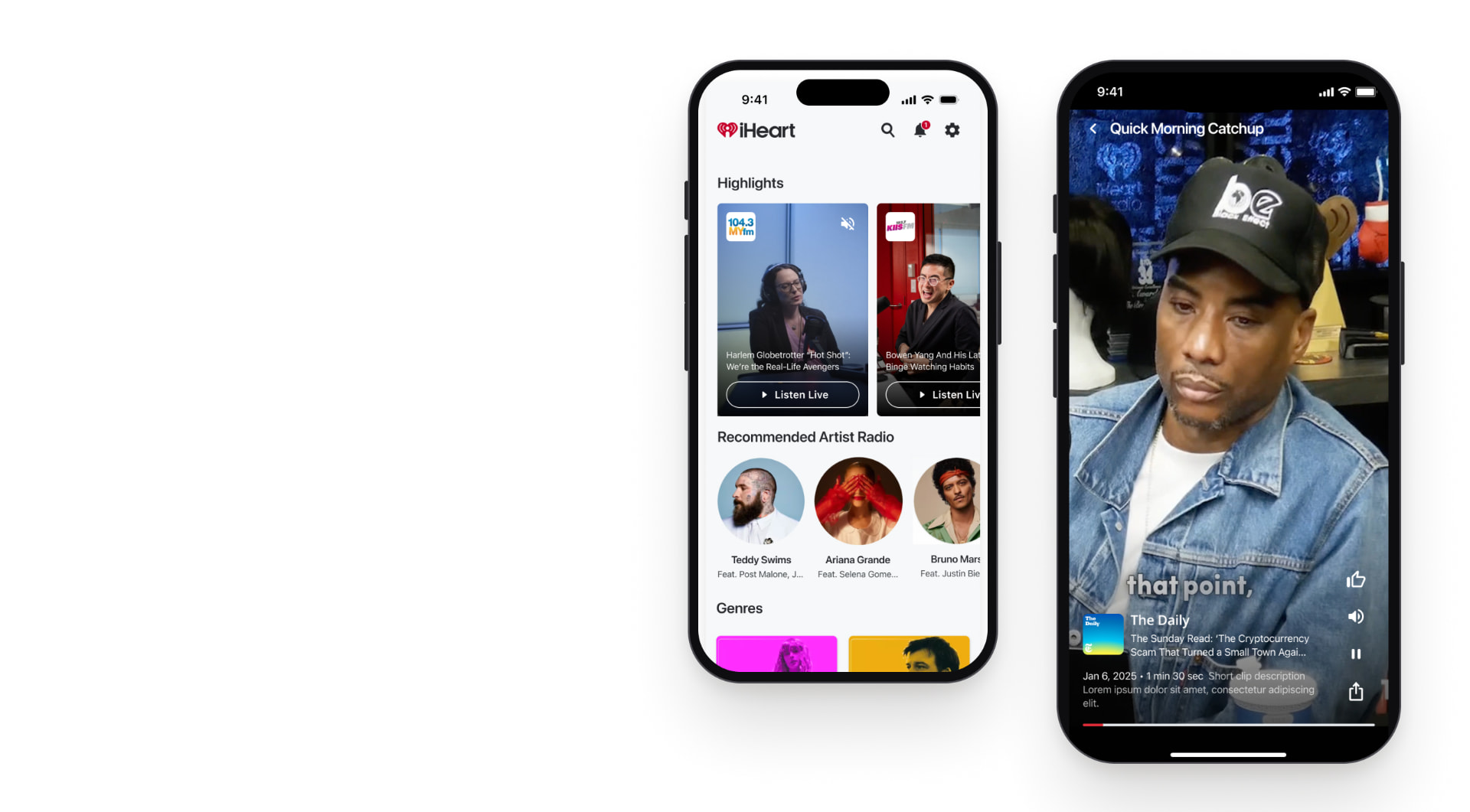
iHeartRadio started bringing short video clips (highlights from radio shows and podcasts) into the app: on Home, in Search, and on the Radio and Podcasts tabs. Clips arrive from an external partner platform. The goal was to show each listener the clips they’d actually care about. The catch: personalization only works if you know what each clip is about, and we didn’t have a shared way to describe that.
For listeners
The same generic clips for everyone, no matter what they listen to.
For iHeart
No common language to tag clips, so no way to personalize, measure or scale them.
The reframe
Personalization depends on taxonomy. Before deciding what to show anyone, we had to agree on how to describe every clip.
03Research
How do others decide which clip you see?
I looked at how clip and short-video experiences organize and personalize content. Three very different models came up, and each told us something about where iHeart should sit.
Apple Podcasts
- How it’s organized: Homepage split into categories; “New” and “Popular” modules sit outside the tag system.
- How it personalizes: Editorial + popularity, not user-specific.
- For iHeart: Categories help browsing, but alone they don’t feel personal.
YouTube Shorts
- How it’s organized: A separate vertical feed; tapping a Short drops you into a chain of related clips.
- How it personalizes: Two layers: explicit (subscriptions) to enter, algorithmic once inside.
- For iHeart: Mix what people tell you with what they do.
Instagram Reels
- How it’s organized: No visible taxonomy at all, just a pure “For You” feed.
- How it personalizes: Fully implicit: watch-through and behavior.
- For iHeart: Powerful, but needs data iHeart clips didn’t have yet.
So we defined three ways to personalize, and what each one needs
Required
Based on behavior
What you do in the app
Plays, skips, replays and long-term topic affinity. The system infers it, no action needed.
Optional
Based on your choices
What you tell the app
Thumbs up or down, and picking categories you want more of.
Optional
Based on everyone
What all listeners do
What’s being played most right now, and what’s newest.
All three depend on the same thing: every clip needs good tags.
04Taxonomy
Most tags can come from the show.
An earlier taxonomy proposal described content through many lenses: mood, activity, time of day. It was rich, but too broad to apply to thousands of clips. I simplified it around one idea: a clip inherits most of what it is from the show it was cut from. Only a few things need to be read from the clip itself.
- 01
The show it came from
Known when the clip is made
e.g. The Breakfast Club, Z100
- 02
Copied from the show
Automatic once set up
Source
Category or genre
Location
Explicit
Language
- 03
Read from the clip
AI suggests, a person confirms
Topic
Local / national / global
Evergreen or timely
Only level 3 needs work per clip, and even there AI does the first pass.
| Clip | Category (from the show) | Topic (from the clip) | Keyword |
|---|---|---|---|
| Morning-show hosts talk about the Super Bowl halftime show | Live Radio · Hip Hop | Music · National · Timely | Power 105.1 · The Breakfast Club |
| Morning traffic update | Live Radio · Pop | News · Local · Timely | Z100 · New York, NY |
| Comedy podcast hosts debate the Grammys | Podcast · Comedy | Entertainment · National · Timely | Las Culturistas · Grammys |
| Hosts explain how a famous historical event happened | Podcast · Society & Culture | History · Global · Evergreen | Stuff You Should Know |
Morning-show hosts talk about the Super Bowl halftime show
Category (from the show): Live Radio · Hip Hop
Topic (from the clip): Music · National · Timely
Keyword: Power 105.1 · The Breakfast Club
Morning traffic update
Category (from the show): Live Radio · Pop
Topic (from the clip): News · Local · Timely
Keyword: Z100 · New York, NY
Comedy podcast hosts debate the Grammys
Category (from the show): Podcast · Comedy
Topic (from the clip): Entertainment · National · Timely
Keyword: Las Culturistas · Grammys
Hosts explain how a famous historical event happened
Category (from the show): Podcast · Society & Culture
Topic (from the clip): History · Global · Evergreen
Keyword: Stuff You Should Know
Category describes the show; topic describes the clip. A comedy podcast can talk about the Grammys, so its topic is Entertainment.
05Placement
Different surfaces, different jobs.
With the taxonomy in place, I connected it to where clips live. Each surface uses a different mix of tags and personalization: Home leans on behavior, Search on what’s popular and what you search for, Radio on stations and location, Podcasts on the show you’re listening to.
1. **Home** · Highlights carousel · Low lift · Live radio first · Tags
2. **Radio** · Station highlights shelf · Medium lift · Live radio · Tags
3. **Podcasts** · Episode clips shelf · Medium lift · Podcasts · Tags
4. **Search** · Clips discovery row · Low lift · Podcasts + radio · Tags
I started with the low-lift placements, Home and Search, so we could launch clips without new screens. Radio and Podcasts shelves come next.
06Personalization · in progress
From signals to clips, one question at a time.
Phase two turns the taxonomy into rules: for every signal iHeart has about a listener, which clips we show, which tags make it work, and what happens when there aren’t enough clips. We agreed on a work order before building anything, so each step answers what the next one needs.
01
DoneUser data checklist
23 signals in 6 groups, with dropdowns so Engineering and Data can answer fast.
02
DoneWhat we show
For each signal: the clips we’d show, the tags that make it work, and the fallback.
03
NextPlacements
Which rule runs on which surface.
04
LaterPersonas
Listener segments, once the basics are proven.
- 23
- signals about a listener
Everything iHeart could know about someone. For each one: do we have it, and can we use it to pick clips?
- Account & context
- User choices
- Listening behavior
- Station data
- Highlights behavior
- Segments & targeting
- Location / market
- Logged in or guest
- Age, ZIP
- Time of day, device
- Genres picked at sign-up
- Presets
- Followed stations
- Followed podcasts
- Saved playlists
- Thumbs up / down
- Recently played
- Listening time per station
- Time of day per station
- Episode completion
- Searches
- Station show schedules
- Clips watched, replays
- Clips skipped
- Tap to full show
- Trending / popular / new
- Listener segment
- Segments for guests
- A/B test group
| Signal | What we show | Tags it uses | If there aren’t enough clips |
|---|---|---|---|
| Presets + time of day per station | Clips from the shows on your preset stations | Station name · Show name | The station’s most popular clips, then same genre |
| Time of day per station + show schedules | Clips from the show you actually hear, even on stations that aren’t presets | Show name | Clips from the station |
| Location / market | Clips from your city’s stations | City · Local topic | National clips |
| Clips skipped | Less of that topic or show | Topic · Show name | Not needed |
Presets + time of day per station
What we show: Clips from the shows on your preset stations
Tags it uses: Station name · Show name
If there aren’t enough clips: The station’s most popular clips, then same genre
Time of day per station + show schedules
What we show: Clips from the show you actually hear, even on stations that aren’t presets
Tags it uses: Show name
If there aren’t enough clips: Clips from the station
Location / market
What we show: Clips from your city’s stations
Tags it uses: City · Local topic
If there aren’t enough clips: National clips
Clips skipped
What we show: Less of that topic or show
Tags it uses: Topic · Show name
If there aren’t enough clips: Not needed
A sample of the signal-by-signal rules. The second row comes straight from the time-of-day insight: it tells us which show someone hears, not what mood they’re in.
Designed with Legal, not around it
When the team flagged existing legal restrictions on user data, I split every rule into two versions, “low legal risk” and “every option”, with a Legal column. The conversation became a yes or no per row instead of a blocker.
07What I learned
AI made me faster at everything around a decision. The decisions still came from people.
Phase one, the taxonomy, is done and shared with the clips partner. Personalization is in progress.